


.jpg_1759869177.3989_9564518c87_fullsize.webp)
.jpg_1758051740.5057_0ad83a0b80_fullsize.webp)

Published Aug 13, 2026
20.245K
Domain & Builder in One Place: The Ultimate Solution for Small Businesses
Nobody starts a small business because they dreamed of configuring DNS records on a Tuesday night. Yet that’s exactly where a lot of founders end up: three browser tabs open, one for the domain registrar, one for the hosting company, one for the site builder, all quietly refusing to talk to each other.
Modern platforms like Wix bundle domain registration, hosting, and website building together for simpler setup, while traditional setups keep them separate. This kind of integrated domain and web hosting is a fundamental shift in how small businesses can approach their online presence, and it’s a big part of why Wix has become one of the go-to names in the small business web design platform space.
Think of it like this: you wouldn’t buy a car engine from one place, tires from another, and the steering wheel from a third, then try to assemble it yourself unless you’re a mechanic. So why do that with your website? For anyone weighing an all-in-one small business website solution against the DIY-vendor route, that question is really the whole article in one sentence.
Unpacking Wix Domain & Builder Integration
What Is Native Integration?
“Native integration” means the domain and the Wix website builder for small business use were designed to work as one system, not bolted together after the fact. When you buy a domain through Wix, it doesn’t need to be “connected” in the traditional sense – it’s already living inside the same account, on the same infrastructure, governed by the same dashboard. There’s no handshake between two companies happening behind the scenes; there’s just one company doing the whole job. This is Wix domain integration in its purest form, and it’s the foundation everything else in this article builds on.
Domain Registration vs. Domain Pointing: The Wix Advantage
If you already own a domain elsewhere, Wix gives you options, and it’s worth understanding them before you commit to a Wix custom domain setup:
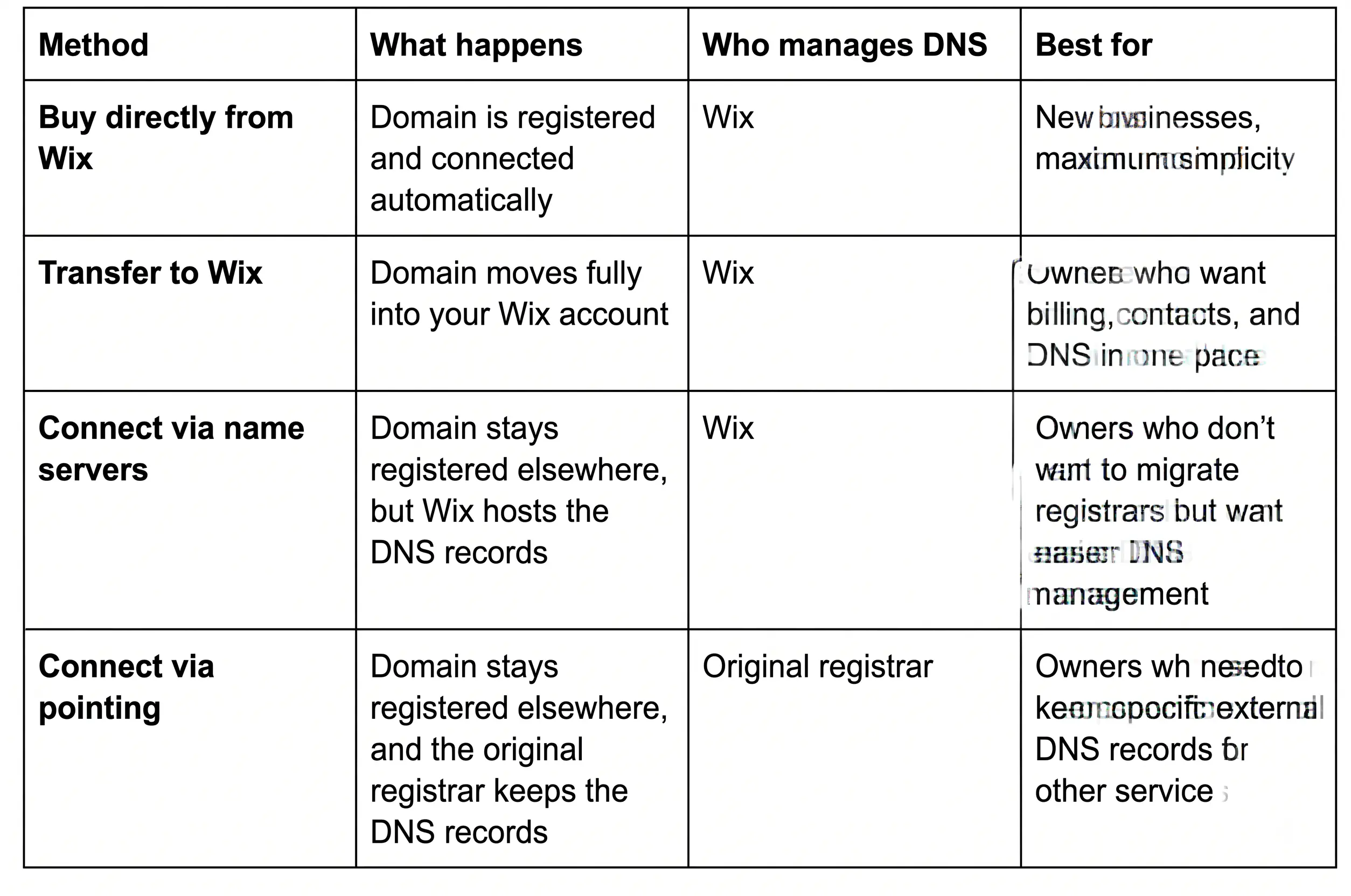
The point isn’t that every option leads to the same place – it’s that Wix lets you choose between transferring a domain so it manages registration, contact info, and DNS records, or simply connecting it while keeping your current host. That flexibility matters, but the “buy it directly from Wix” path is where the real magic happens, because domains purchased from or transferred to Wix are automatically connected via name servers – no manual setup required at all. It’s a big part of the answer to why buy a domain directly through Wix instead of juggling a separate registrar.
Eliminating DNS Misconfigurations (A-Records, CNAMEs, and Name Servers)
If you’ve never had to deal with A-records or CNAMEs, count yourself lucky, and let’s keep it that way. These are the technical addressing rules that tell the internet “when someone types this domain, send them here.” Get one character wrong, and your site either doesn’t load or, worse, loads intermittently in a way that makes you question your own sanity for a week.
When the domain and builder are integrated, Wix handles Wix DNS configuration in the background. You’re not manually entering IP addresses into a third-party registrar’s dashboard hoping you copied them correctly, which is exactly what makes this a real example of domain connection without technical skills getting in the way.
Core Business Benefits of a Unified Platform
Automated SSL Certificates and Zero-Downtime Deployment
SSL certificates used to be one of those things you paid a “web guy” $150 a year to handle. Not anymore, at least not on Wix. Every Wix domain comes with a free SSL certificate automatically, regardless of the domain extension, and once your domain is connected to your website, the certificate is issued and activated without any setup or technical knowledge required. Even better, the system activates SSL automatically for connected custom domains, and Wix generates the certificate in the background and enables HTTPS for the site, including any subdomains you’re using.
You publish, and your padlock icon just… appears. No certificate requests, no expiration panic every twelve months – that’s the automated SSL certificate Wix builds into every plan, and it’s one of the clearest, most concrete examples of how Wix domain integration saves small business time.

Single-Invoice Financial Management and Consolidated Billing
There’s an underrated financial win here too. Fragmented stacks mean fragmented invoices: one charge for the domain renewal, one for hosting, one for the SSL add-on, one for the builder subscription – often on different billing cycles, from different companies, in different currencies if you’re unlucky.
A unified platform collapses that into one predictable line item. Consolidated web hosting and domain billing means a small business owner doing their own bookkeeping (which, let’s face it, is most of them) isn’t reconciling four vendors; it’s hours saved every year at tax time.
Enhanced Platform Security and Centralized Access Control
When one company controls your domain, DNS, and site, security also gets simpler to reason about. Wix uses transfer locks and ICANN security rules to help reduce unauthorized transfers and protect domain ownership, and domain-level protections like DNSSEC and domain locking sit right next to your site settings instead of in a separate portal you log into twice a year and forget the password for.

SEO and Brand Building Synergy
Native SEO Setup and Instant Google Indexing
A custom domain is foundational to SEO. Search engines treat a branded domain (yourbusiness.com) very differently from a generic subdomain, and because the domain and site are integrated on Wix, technical SEO essentials – sitemaps, meta tags, mobile responsiveness, HTTPS (which Google explicitly favors as a ranking signal) – are wired in from day one rather than needing separate configuration across separate tools.
Professional Email Alignment (Google Workspace via Custom Domain)
Here’s a detail worth flagging clearly: the SSL certificate Wix provides is for your website, and it cannot be used for business email. But that’s not really a gap – it’s a separation of concerns. Once your custom domain is live on Wix, connecting it to Google Workspace for professional email (you@yourbusiness.com instead of you@gmail.com) is a standard, well-documented flow. Google Workspace integration Wix–style is the same domain infrastructure doing double duty: one for your site, one for your inbox, both reinforcing the same brand identity.
Domain Authority and Brand Consistency from Day One
A few quick wins that matter more than people expect:
- A branded domain builds trust the instant someone sees it in a search result or on a business card.
- Consistent domain, email, and site branding reduces the “is this a scam?” hesitation new visitors feel.
- Domain authority compounds over time, but only if the domain stays stable, which is easier when it isn’t shuffled between vendors.
These are also some of the clearest benefits of using Wix for domain registration and web design together rather than separately – brand consistency is much harder to break when there’s only one system to keep in sync.
Operations and Scalability: Saving Time to Drive Growth
Single-Dashboard Site, Domain, and Marketing Management
Running a small business already means wearing ten hats. The operational case for integration is arguably the strongest one: one login, one dashboard, one place to check analytics, update the site, renew the domain, and launch a marketing email, instead of remembering which of five tools does which job.
Effortless Transition to E-Commerce and Lead Generation
Businesses evolve. A portfolio site becomes a booking site becomes an online store. On a fragmented stack, that evolution often means migrating hosts or rebuilding from scratch. On an integrated platform, a Wix e-commerce domain setup is a plan change, not a migration project – the domain, SSL, and DNS setup carry over without being touched.
Reduced Maintenance Costs and Elimination of External Webmaster Fees
This is the quiet cost small businesses rarely put a number on: the freelance "webmaster" retainer that exists purely to handle DNS tweaks, SSL renewals, and the occasional "why is my site down" emergency. When the platform handles those tasks natively, that retainer often becomes unnecessary, or at least much smaller in scope.
How Wix Compares to Multi-Vendor Setup Models
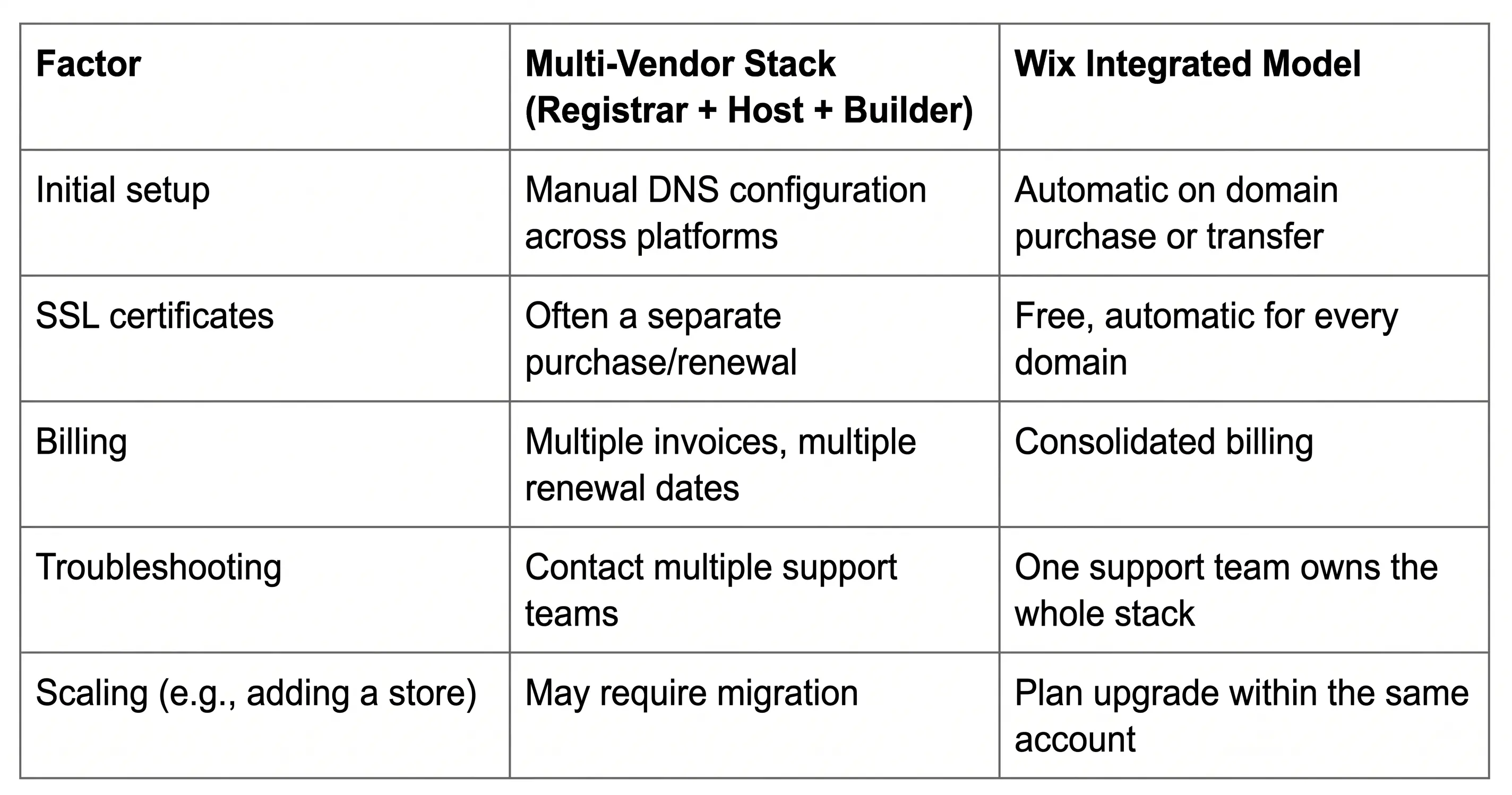
The Complex Stack vs. The Wix Model
Troubleshooting Efficiency: One Dedicated Support Team vs. Pointing Fingers
Anyone who's managed a multi-vendor stack knows the drill: the site's down, you call the host, the host says it's a DNS issue, you call the registrar, the registrar says it's a hosting issue, and an afternoon disappears into a game of technical hot potato. With the domain, DNS, and site all connected within one account, there's no "not my department" moment – one team, one system, one place to get an actual answer.
Conclusion: Streamlining Your Path to Digital Success
Add it all up – no DNS guesswork, free automatic SSL, one invoice instead of four, no webmaster retainer, and a support team that actually owns the whole problem – and the return on choosing an integrated platform isn't abstract. It shows up directly in hours saved and dollars not spent. If you’re still mapping out the steps for connecting a custom domain to a Wix builder, the process boils down to this: pick a domain, choose whether to buy it through Wix or connect one you already own, and let the platform handle the DNS and SSL work behind the scenes. That’s the real case for Wix domain and builder integration: not that it’s flashy, but that it gets out of your way.