




.jpg_1759869177.3989_9564518c87_fullsize.webp)
.jpg_1758051740.5057_0ad83a0b80_fullsize.webp)


Published Jan 03, 2026
4.482K
Shopping Smarter with Shipt: Tips for Maximizing Your Experience
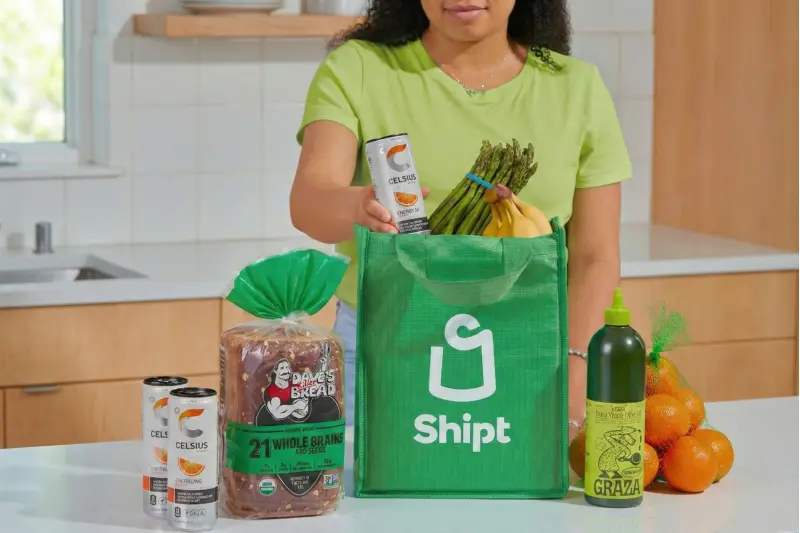
You know the feeling. It’s Sunday evening, and you suddenly remember: The grocery store. A wave of dread washes over you as you mentally calculate the cost – not just the money, but the time. The traffic, the crowded parking lot, the endless aisles, the line that snakes around the deli counter. You’ll lose a solid two hours of your precious weekend, only to get home and realize you forgot the one thing you actually went for.
What if you could just… skip it?
This is the promise of shopping with Shipt. It’s that little sigh of relief when you delegate a chore that’s been hanging over your head. But what if I told you that you could be even better at it? That with a few simple Shipt shopping tips, you could transform the service from a convenient novelty into a seamlessly integrated part of your life, saving you not just time, but also stress and mental energy?
This guide is your friendly roadmap. Whether you're a new user wondering how to use Shipt or you’ve already placed a few orders, we’re going to dive into the best Shipt tips and tricks that go beyond the basics. Let’s turn you into a Shipt power user, together.
Laying the Groundwork: Your Pre-Shop Shipt Strategy
A flawless Shipt delivery begins long before a shopper even sets foot in a store. A little pre-game planning is the secret weapon of every power user. Think of it as the foundation for a perfect experience. Understanding how does a Shipt shopping work starts with your preparation.
Building Your Digital Pantry: The Master List
The single most effective Shipt shopping tip is to create a "Master List" within the app. This is your running tally of all your household's regularly purchased items.
- Efficiency is Key: Instead of browsing the entire digital store each time, you can simply open your saved list and check off what you need. This saves a significant amount of time and prevents the dreaded "what did I forget?" feeling.
- Categorize for Clarity: For an even smoother process, organize your list into categories like Produce, Dairy, Pantry, and Household. This mimics the flow of a physical store, making the Shipt shopper's walkthrough of your order more intuitive and efficient for them.
The Devil's in the Details: Mastering Special Requests
When you’re not physically there to squeeze the avocados or select the perfect bunch of bananas, your instructions are your proxy. This is one of the most crucial Shipt shopper tips and tricks you can employ.
Be incredibly specific in the "special instructions" field for each item. For example:
- Bananas: "Please choose 5-6 yellow, slightly green bananas."
- Avocados: "I need 2 ripe for using tonight, please check for softness."
- Bread & Dairy: "Please select the item with the expiration date furthest out."
- Meat: "Please choose a pack with a bright red color and no excess liquid."
This level of detail dramatically reduces the need for substitutions and ensures you get exactly what you want.
Timing is Everything: Scheduling for Success
Using Shipt during peak hours (like weekend mornings or the after-work rush) can mean fewer available delivery windows and busier shoppers. To optimize your experience:
- Aim for Off-Peak Times: If your schedule allows, try scheduling your delivery for a weekday morning or early afternoon. You’ll often find more open slots and a less hectic store environment for your shopper.
- Build in a Buffer: A pro-tip is to schedule your delivery window to end before you actually need the groceries. This creates a cushion for any unforeseen delays and ensures you’re never left waiting for a crucial ingredient for dinner.

Use your master list to effortlessly re-stock your home's core necessities without ever leaving your couch.
The Human Element: Communication and Gratitude
This is the heart of the Shipt experience. Your shopper isn't a faceless courier; they are your personal proxy in the store, navigating the aisles on your behalf. A successful shop is a team effort.
Be Present: The Power of Responsive Communication
The golden rule: be available and responsive during your shopping window. Once your shopper begins, stay near your phone. The text message chain (or in-app chat) is your direct lifeline. They will message you about out-of-stock items, ask about substitutions, and provide friendly updates.
Quick responses are the engine of a smooth and efficient shop. It’s the difference between getting a suitable replacement and getting a refund. Enabling notifications is a non-negotiable tip for Shipt shoppers who want the best possible outcomes.
Navigating the Inevitable: A Guide to Substitutions
Let's face it, out-of-stock items are a fact of life. But they don't have to derail your entire order. How you handle substitutions in using the Shipt shopper app is one of the most impactful Shipt shopper tips for a smooth experience. Think of it as giving your shopper a helpful game plan before they even start.
Here is a simple list to guide your choices:
- For Must-Have Items: Pre-select your preferred substitution in the app. If you don't see one, choose "Contact Me" and add a note like, "If out of stock, a similar brand of whole wheat pasta is fine."
- For Flexible Items: Empower your shopper by selecting "Use Best Judgment" for things like paper towels, your favorite brand of potato chips, or canned beans. This is a key Shipt shopper trick that shows you trust their expertise and saves everyone precious time. It’s a simple gesture of partnership that makes the entire process smoother, and it’s something great shoppers remember, which is just as important as knowing how to tip a Shipt shopper at Target.
- For Strictly Specific Items: Only use "Do Not Substitute" for allergy-related products, a specific baby formula, or a required ingredient for a recipe where there is no alternative.
Showing Appreciation: Shipt Tipping and Rating Etiquette
Now, let’s talk about the topic everyone wonders about: tipping with Shipt. Understanding how to tip Shipt shoppers is a fundamental part of the process. Shoppers are independent contractors, and tips are a significant part of their income.
So, do you tip with Shipt? Absolutely. The question of does Shipt has tips is easily answered in the app – yes, and you can add a tip during checkout or after delivery. The standard service industry practice of 15-20% is a great benchmark for good service. For a large, heavy order or truly exceptional service, consider tipping more. Remember, no tips Shipt orders can be disappointing for the hardworking person who just carefully shopped for you.
Similarly, rating your shopper fairly is important. The rating system can directly impact a shopper’s access to orders. Reserve a rating below 5 stars for significant service failures. For minor issues, it’s better to contact Shipt support directly. This allows the shopper to receive feedback without being unfairly penalized.
.jpg_1767402842.2179_0492529191_fullsize.webp)
Leveling Up: Advanced Shipt Strategies
Once you’ve got the basics down, it’s time to level up. These Shipt tips and tricks will help you use the service in ways you might not have considered, making it an even more integrated part of your life.
Find a Shopping Soulmate: The Favorite Shopper Feature
Have you ever had a shopper who was just phenomenal? They found everything, communicated perfectly, and packed your groceries with care. You can request them again! Shipt’s "Favorite Shopper" feature allows you to mark these all-stars. The system will then try to match you with them for future orders. This builds a wonderful rapport; they’ll learn your preferences, and you’ll get a consistently excellent experience. It’s a win-win.
Think Beyond the Grocery Aisle
A common question is, how does Shipt shopping work for other stores? The platform is a powerhouse for more than just food. It partners with a wide array of retailers. This list highlights just a few possibilities:
- Pharmacies (CVS, Walgreens): Perfect for last-minute medicine, health, and beauty needs when you're feeling under the weather.
- Pet Stores (Petco): Ideal for having heavy bags of pet food and bulky cat litter delivered right to your door.
- Office Supply Stores (Office Depot/OfficeMax): A lifesaver for urgent supplies for working or schooling from home.
- Home Goods Stores (Bed Bath & Beyond, The Container Store): Great for organizational items, kitchen tools, and decor.
This transforms Shipt from a grocery service into a full-blown "errand elimination" service.
The Power of the Bundle
You can place orders from multiple stores in the same delivery window. Need a prescription from CVS and groceries from your local supermarket? Schedule the deliveries back-to-back. This is the ultimate Shipt shopping tutorial pro-tip for maximizing the value of your membership and condensing all your errands into one convenient block of time.
.jpg_1767403189.0825_98264da12c_fullsize.webp)
Maximizing Your Membership Value
Let’s talk value. Is the Shipt membership worth it? For most regular users, the answer is a resounding yes. The key is to use it strategically.
Calculating Your Break-Even Point
Do a quick break-even calculation. Compare the cost of an annual membership to what you’d pay in individual delivery fees without one. If you use the service even just twice a month, the math usually works out heavily in the membership's favor. You’re investing in time – time you can spend with family, on hobbies, or simply relaxing.
Capitalize on Promotions and Trials
Furthermore, always be on the lookout for promotions. Shipt often runs specials, especially for new members. Which brings us to two fantastic offers to get you started...
There's never been a better time to commit to smarter shopping and greater savings.
Enjoy unlimited deliveries with a 14-day free trial. Offer is subject to Terms & Conditions
.jpg_1767403533.4861_163ea2f70d_fullsize.webp)
Offer is subject to Terms and Conditions
Enjoy nowReclaim Your Time, One Delivery at a Time
Using Shipt to its full potential is about more than just getting groceries delivered. It’s about strategically outsourcing a time-consuming chore to reclaim hours of your week. By planning your order, communicating like a pro, and leveraging the platform's advanced features, you transform a mundane task into a seamless life hack.
Your time is your most valuable asset. With these Shipt shopper tips, you’re no longer just a customer; you’re an expert, equipped with the knowledge to make the platform work perfectly for you. So, open the app, put these tips on Shipt into practice, and turn your next delivery into a masterclass in efficiency and ease. Happy (smarter) shopping!
FAQ
What are the absolute best Shipt tips for a new user?
The best Shipt tips for getting started are to create a detailed "Master List" of your regular items, always be specific with special instructions (like banana ripeness), and stay available by your phone during the shop for quick communication. Scheduling your orders for off-peak times like weekday afternoons also ensures a smoother experience for you and your shopper.
How exactly do I tip with Shipt for an order?
Tipping with Shipt is simple and is done directly within the Shipt app. After your delivery is complete, you can go to your order history, select the order, and you'll find an option to "Add Tip." The app allows you to tip a percentage of the order total or a custom flat amount, typically following the standard service industry guidance.
When is the best time to schedule a Shipt delivery?
For the most reliable service and widest selection of delivery windows, the best time to schedule is during off-peak hours. We recommend weekday mornings or early afternoons. Avoid weekends and the after-work rush (5-7 PM) for a less hectic experience and more shopper availability.
Disclosure: This article may include affiliate links, which means TopForLess may receive a commission if you make a purchase through those links. This helps support our website and allows us to keep sharing deals and shopping tips. There’s no extra cost to you.
.jpg_1767402842.2179_0492529191_fullsize.webp)
.jpg_1767403189.0825_98264da12c_fullsize.webp)
.jpg_1767403533.4861_163ea2f70d_fullsize.webp)